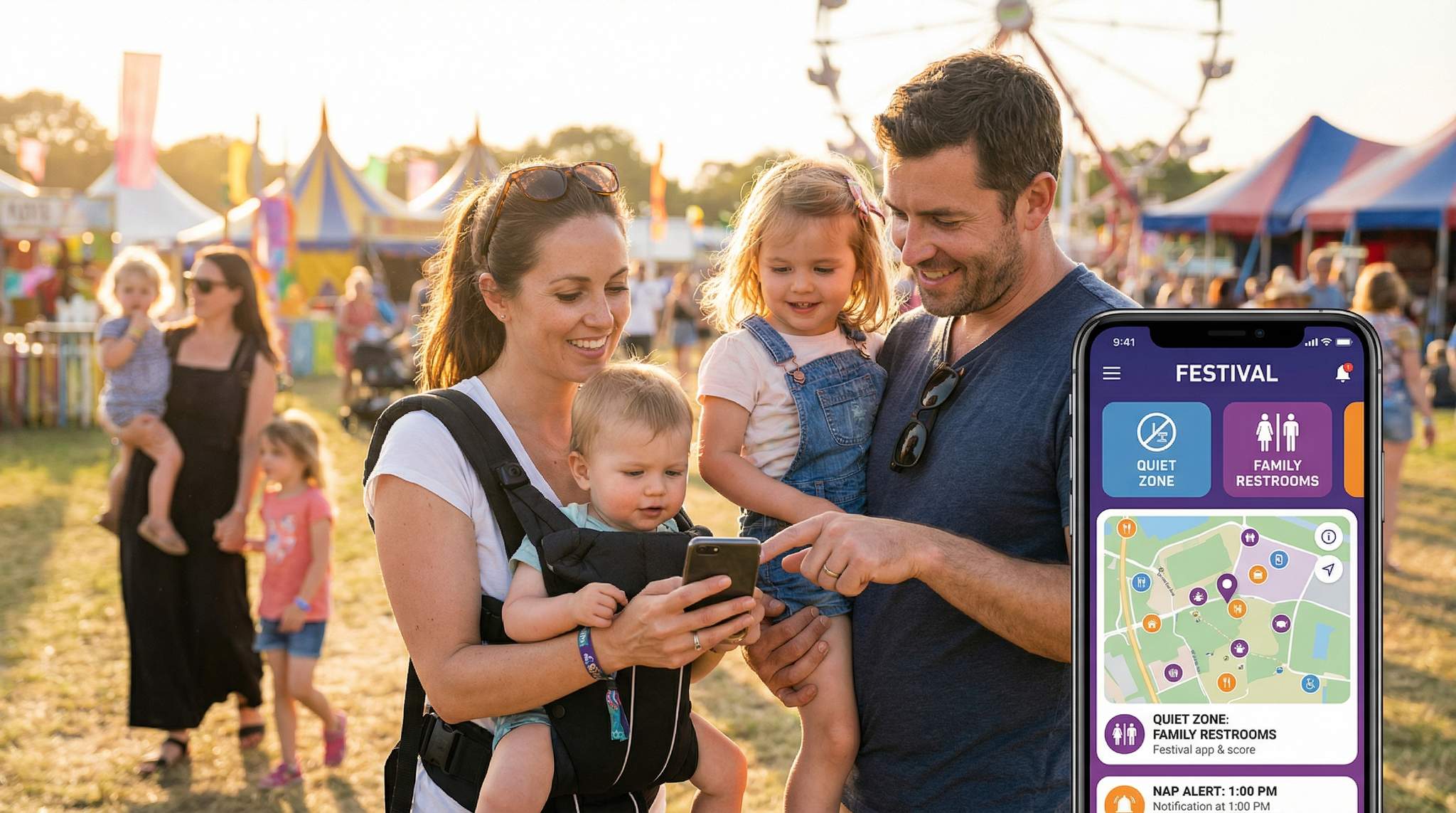
Festival producers around the world are increasingly catering to parents and children at events. Many modern festivals now brand themselves as family-friendly experiences, complete with kids’ zones, child-safe amenities, and even dedicated apps to guide parents. For example, Camp Bestival in the UK is an award-winning festival designed as a family holiday, as highlighted in this parent review, and it even offers an official app that helps parents plan their family adventure and stay updated on attractions. To support families in crowds and high-energy environments, a “Family Mode” in festival apps can provide targeted filters, timely alerts, and handy shortcuts. These tech features are not about flashy gimmicks – they’re practical tools to lower stress for parents and create a safer, more enjoyable festival experience for all ages.
Map Filters for Family Amenities
Navigating a big festival site with small children, prams, and gear can be daunting. A Family Mode can include special map filters that highlight only the facilities families truly need. By toggling these filters on the festival’s mobile app, parents can instantly spot stroller-friendly routes, family restrooms, and quiet areas on the event map without wading through unrelated points of interest. This saves precious time and energy when tending to kids’ needs in a busy venue.
Key amenities to include:
-
Stroller-Friendly Routes: Not all paths at a festival are easy with a buggy or wagon. Families often bring foldable wagons or strollers to transport kids and gear over festival terrain, a strategy recommended for managing naps, so the app should highlight accessible, step-free pathways. These could mirror the event’s wheelchair-accessible routes or gentler slopes, ensuring parents can avoid stairs, steep hills, and thick mud. Clearly marked stroller routes help caregivers move around smoothly instead of getting stuck in crowds or rough ground.
Free Tool: Size Your Festival Site
Zoned capacity planning for arena, campsite, parking and entry lanes — against UK Purple Guide and NFPA density standards. Finds your bottleneck zone.
-
Family Toilets & Baby-Changing Stations: Finding a clean, convenient toilet for a toddler or a baby-changing tent in a sea of tens of thousands of people can be stressful. Map filters can shine a beacon on the nearest family restrooms, baby-changing facilities, or nursing stations. Many major festivals now provide these amenities – for instance, Electric Picnic in Ireland offers a peaceful baby feeding and changing area in its family zone where parents can rest and resupply, featuring dedicated Mamia feeding stations. With an app filter, a sleep-deprived parent can, at a tap, see exactly where the closest diaper-changing station is instead of rushing from tent to tent.
-
Quiet Zones and Sensory Rooms: Festivals are loud and stimulating – great for adults, but sometimes overwhelming for kids (and children with sensory sensitivities). A Family Mode toggle can reveal designated quiet areas or sensory-friendly rooms on the map. These are spaces where families can take a break from the noise and crowds. For example, the Moreton Kids Festival in Australia sets up a shaded Quiet Zone where families can escape the hustle and wind down away from loud music, offering a shaded retreat for families. Likewise, some events have “sensory friendly” tents with soft lighting and beanbags for anyone who needs a calm moment. By clearly marking these sanctuaries in the app, organisers make it easy for parents to find a quick oasis for an overstimulated child on the verge of a meltdown.
Planning a Festival?
Ticket Fairy's festival ticketing platform handles multi-day passes, RFID wristbands, and complex festival operations.
Having on-demand map filters for such family-centric facilities means parents aren’t fumbling through menus or paper maps while their toddler is crying. It’s all right there on their phone, helping them tend to needs faster. The result: happier kids, relieved parents, and fewer frustrated families wandering around – which benefits overall crowd mood, too.
Timely Alerts for Naps and Weather
Keeping young children happy at a festival often comes down to timing. Babies and toddlers have their own internal clocks – when they need to nap or eat, they let you know (not always politely!). Sudden weather changes can also make or break the family experience, whether it’s a heat wave requiring shade and sunscreen or a surprise rain shower turning paths into puddles. A smart Family Mode uses push alerts to give parents a heads-up at just the right moments, so they can plan ahead instead of reacting in panic.
Imagine an app that knows the festival schedule and the typical “nap windows” for little ones around midday or early afternoon. It could gently ping parents around 1:00 PM: “Feeling the midday lull? This might be a great time for a nap break. The Quiet Zone at the Family Garden is open and mellow right now.” Such a nudge can remind parents to take that breather and attempt a stroller nap or quiet time, before an overtired tantrum erupts. It reinforces what seasoned parents already advise – try to stick to a child’s routine as much as possible even amid the fun. Taking a brief break in a calmer spot can help children recharge and prevent late-day meltdowns.
Similarly, weather alerts can be a lifesaver. Festivals are outdoor affairs, and conditions can shift quickly. An app in Family Mode might send an alert saying: “Temperature is rising to 30°C – remember to reapply sunscreen and hydrate your kids.” or “Rain expected in 15 minutes – grab those ponchos or seek shelter.” These timely tips spare families from being caught off-guard. At large events, safety teams already monitor weather closely; funneling that info straight to a parent’s phone means moms and dads don’t have to constantly scan the skies or news themselves. It’s like having a personal meteorologist and nanny rolled into one.
Free Tool: Project Your Bar Revenue
Per-head spend benchmarks by event type turned into projected bar and food revenue, with a stock-mix estimate and gross-margin line. Free calculator.
Importantly, these alerts should be opt-in and intelligently timed. You don’t want to spam attendees’ phones or wake a baby with needless pings at 3 AM. But well-designed notifications can truly enhance a family’s experience. Industry experts note that for a family-centric festival, the app’s communication might emphasise safety notices and child-friendly reminders more than a regular music festival would, aligning with specific event goals. That might include alerts about kid program start times (so you don’t miss the puppet show your child was excited for) or a lost-child announcement system. All these real-time updates give parents peace of mind that they won’t miss important information while juggling snacks, ear defenders, and restless youngsters.
Bottom line: proactive, context-aware alerts help parents stay ahead of potential issues. By suggesting the best times for naps and warning about weather or other hazards, the app helps families avoid crises before they happen. It’s a lot easier to enjoy that afternoon band when you’re not anxiously eyeing dark clouds or an overtired toddler.
Need Festival Funding?
Get the capital you need to book headliners, secure venues, and scale your festival production.
Quick Navigation Shortcuts (Meeting Points & More)
Even the most attentive parents and oldest siblings can get separated in a crowded festival. With thousands of people milling about, losing track of your group is a common occurrence – and a terrifying one when children are involved. That’s why a Family Mode should offer quick shortcuts for navigation, especially a fast way to either reunite with your group or get help.
A popular safety tip for festivals is to establish a designated meeting point for your family in case anyone wanders off. Seasoned festival-goers often write a parent’s phone number on a child’s wristband or arm as a backup, a vital tip for surviving festivals, and agree on an easy landmark (“meet at the big ferris wheel if we get separated”). The festival app can take this further: with a “Find My Meeting Point” button, parents and kids (if the kids are old enough to have a phone) could instantly see the route to the chosen spot. For instance, you might drop a pin on the interactive map at your chosen tree or info booth when you arrive. Later, if your teenager goes to the restroom and loses their way back, they can open the app, tap the meeting point shortcut, and follow the map straight to the reunification spot.
Some festivals set up official Lost Child tents or Family Info booths – those should be highlighted in the app too. A worried parent trying to find a missing child can hit “Locate Help” and get directions to the nearest staff security point or lost-child facility immediately, instead of running around in panic. Conversely, if a lost child is found by staff, an alert (as mentioned earlier) could be pushed out, and the meeting point feature could guide parents there calmly.
Modern event apps already have the building blocks for this. Many allow attendees to drop personal markers on the map – for example, pinning the location of your parked car or campsite. At the massive Glastonbury Festival in England, a third-party offline map app became popular because it let people set personal tent markers to navigate back to them in the huge campsite. Family Mode can repurpose that idea: a personal marker for “home base” or “family meet-up.” With one-tap shortcuts or home-screen tiles within the app, users don’t have to dig through menus during an emergency – the directions to safety are front and center.
Interactive Seating for Every Venue
Let fans pick their perfect seat with interactive venue maps. Supports reserved seating, section-based pricing, and real-time availability.
Additionally, festival apps can integrate with phone GPS and even simple friend finder tools. While data connectivity can be spotty (we’ll address that soon), some apps use Bluetooth or offline map data to show approximate locations. Even without live tracking, just having a pre-agreed point to rally and a clear map can greatly reduce the panic of temporary separation. The goal is to turn a potentially traumatic moment into a straightforward task: open the app, follow the arrow, hug reunited family.
Offline, Battery-Lite Maps
Tech features are fantastic – as long as they work when you need them. At festivals, one of the biggest challenges is connectivity and battery life. Large events often take place in remote fields or congested city parks where mobile signals get overloaded by the crowd. The last thing a family needs is to rely on an online map that won’t load or a phone that dies right when you need to locate the nearest toilet. Therefore, a crucial aspect of Family Mode (and indeed any festival app feature) is to offer offline, battery-friendly functionality.
To appreciate the importance of offline maps, consider the cautionary tale of Glastonbury Festival’s official app a few years ago. With around 200,000 attendees on-site, the cell networks were jammed and the app’s map—which required internet—became practically unusable. Attendees flooded social media with complaints about the poor map, frustrated that they couldn’t get a phone signal and the app had no offline option, leaving attendees without interactive maps. Trying to navigate a huge festival with kids in tow, while an app just shows a spinning wheel, can be a nightmare scenario.
The solution is straightforward: make maps and schedules available offline. A well-designed festival app should prompt users to download the site map and key info in advance (or at least when Wi-Fi or good signal is available). That way, even if you’re in a signal dead zone or you switch your device to airplane mode to save power, the interactive map still works. All those family amenities – toilets, water points, stroller routes, first aid – should be visible without needing an internet connection. Some apps even store a satellite GPS layer offline so that the blue dot of your location still appears on the map to guide you.
Equally important is keeping the app battery-efficient. Festivals are all-day (or multi-day) adventures, and families often rely on their phones for many things: taking photos of memories, communicating if they split up, mobile payments for food, and of course the festival app. The Family Mode features should be optimized not to drain battery excessively. This means using simple vector maps instead of heavy 3D graphics, limiting constant GPS polling, and avoiding high-power-consuming features like augmented reality overlays. It’s also wise to include a low-brightness or dark mode for using the map at night or in low light without burning through screen battery (and as a bonus, not blinding a child who’s finally sleeping in a dark tent).
Festival organizers can take additional steps like offering charging stations on-site or portable battery rentals, but these often have queues and costs. From a tech perspective, the most family-friendly thing is an app that just keeps working through the day. An example of innovation here comes again from the fan community at Glastonbury: a third-party team made an offline navigation map that let users filter points of interest and save personal locations, all without data connectivity, proving essential for navigating the site. It was a hit because it simply worked when the official app couldn’t. The lesson: build offline-first, and you’ll win the trust of parents who know that Murphy’s Law loves to strike at the worst times (like when your toddler is doing the “potty dance” and the network drops).
Free Tool: When Should You Announce?
Pick your event date and genre — the free planner outputs a recommended announce, presale, on-sale and reminder schedule anchored to how your audience actually buys.
By ensuring the festival app remains functional in low-signal conditions and mindful of battery drain, event organisers drastically reduce technical hiccups for families. Parents can confidently rely on the app throughout the day – and that reliability itself lowers stress. No one wants to be carrying a tired child around searching for a charger or climbing a hill to get reception just to find the parking lot. Design for the worst-case scenario (no signal, low battery), and families will thank you.
Useful Tech, Happier Families
All these Family Mode features boil down to one goal: making the festival experience as joyful and low-stress as possible for parents and kids alike. When festival organisers invest in thoughtful tech tools, it shows that they understand the unique challenges families face in the event environment. The payoff is huge. Parents who have a positive, stress-free adventure are more likely to stay longer, spend more, and return in following years – not to mention spread the word that your festival is truly family-friendly.
Importantly, creating a great family experience doesn’t mean dumbing down the festival or turning it into a playground; it means removing unnecessary friction so that families can enjoy the music, food, art, or culture on offer. An app’s Family Mode is like having a digital concierge for all those little things that can become big hurdles when you have children with you. By finding the quickest route around a parade for a stroller, suggesting the ideal time for a nap break, pointing out where to warm a bottle, or helping a lost kid reunite with mom, technology can significantly ease the mental load on parents attending the event.
Several festivals across the globe have earned loyal followings among young parents by going the extra mile. In the UK, the legendary Glastonbury Festival devotes an entire Kidzfield area to children’s entertainment (complete with big-name kids’ performers and loads of activities), offering tips for parents bringing babies, proving that even one of the world’s biggest music festivals welcomes its youngest attendees. In the US, major events like Lollapalooza now feature a dedicated Kidzapalooza stage and family activities, showing that kid-friendly offerings are becoming mainstream. In Australia, Splendour in the Grass partnered with KidzKlub to create a magical children’s space called Little Splendour, allowing even the youngest festival-goers to immerse themselves in play and creativity throughout the weekend, allowing families to enjoy the festival together. Each of these initiatives goes hand-in-hand with providing clear information and support through festival communications (apps, guides, signage), ensuring families know about these offerings and can access them easily.
By partnering with an event technology provider that supports rich mobile engagement (such as Ticket Fairy), organisers can integrate these Family Mode features seamlessly into their digital toolkit. Leveraging an all-in-one platform that handles ticketing, communications, and mobile guides in one place can make implementing family-friendly tech both feasible and straightforward.
For the next generation of festival producers, the message is clear: embrace technology that puts families first. By implementing a Family Mode with practical filters, alerts, and shortcuts, you turn your event’s app into an indispensable parent sidekick. This not only leads to more positive experiences and memories for attendees, but also cements your reputation as a festival that truly cares. And that is the kind of brand loyalty money can’t buy.
Frequently Asked Questions
What is Family Mode in festival apps?
Family Mode is a specialized feature in event apps that provides targeted filters, alerts, and shortcuts specifically for parents. It highlights amenities like stroller-friendly routes and family restrooms while offering timely notifications for naps and weather to lower stress and create a safer festival experience.
How can I find stroller-friendly routes at a music festival?
Parents can locate accessible pathways by toggling specific map filters within the festival’s mobile app. These filters highlight step-free routes and gentle slopes, often mirroring wheelchair-accessible paths, to help caregivers avoid stairs, steep hills, and mud while transporting children and gear through the venue.
What amenities should be included in a family-friendly festival map?
Essential family amenities for festival maps include stroller-friendly routes, family restrooms with baby-changing stations, and designated quiet zones. Advanced apps also highlight nursing stations and sensory-friendly rooms, allowing parents to quickly locate facilities needed to manage children’s needs in crowded venues without searching aimlessly.
How do festival apps help prevent children from getting lost?
Festival apps enhance safety by offering quick navigation shortcuts to pre-designated meeting points, helping separated groups reunite easily. They also clearly highlight the locations of Lost Child tents and Family Info booths on the map, allowing parents to instantly generate directions to security staff during an emergency.
Why are offline maps important for festival apps?
Offline maps are crucial because large crowds often overload mobile networks, rendering online navigation tools unusable. Downloadable maps ensure essential features like amenity locations, schedules, and GPS positioning remain functional even in signal dead zones or when devices are in airplane mode to preserve battery life.
What are sensory-friendly quiet zones at festivals?
Sensory-friendly quiet zones are designated areas where families can escape loud music and crowds to prevent overstimulation. Often marked on festival app maps, these spaces may feature shade, soft lighting, and beanbags, providing a calm sanctuary for children to recharge and avoid potential meltdowns.
How can push notifications improve the family festival experience?
Intelligent push notifications assist parents by sending timely reminders for nap windows and weather changes. Apps can alert families about rising temperatures requiring hydration, approaching rain showers, or start times for kid-friendly performances, helping caregivers plan proactively rather than reacting to crises.
Do festival apps drain phone battery quickly?
Poorly optimized apps can drain power, but family-friendly designs prioritize battery efficiency by using simple vector maps and limiting constant background GPS usage. Features like offline functionality and dark mode help preserve battery life, ensuring the app remains usable for navigation and safety throughout the entire event.